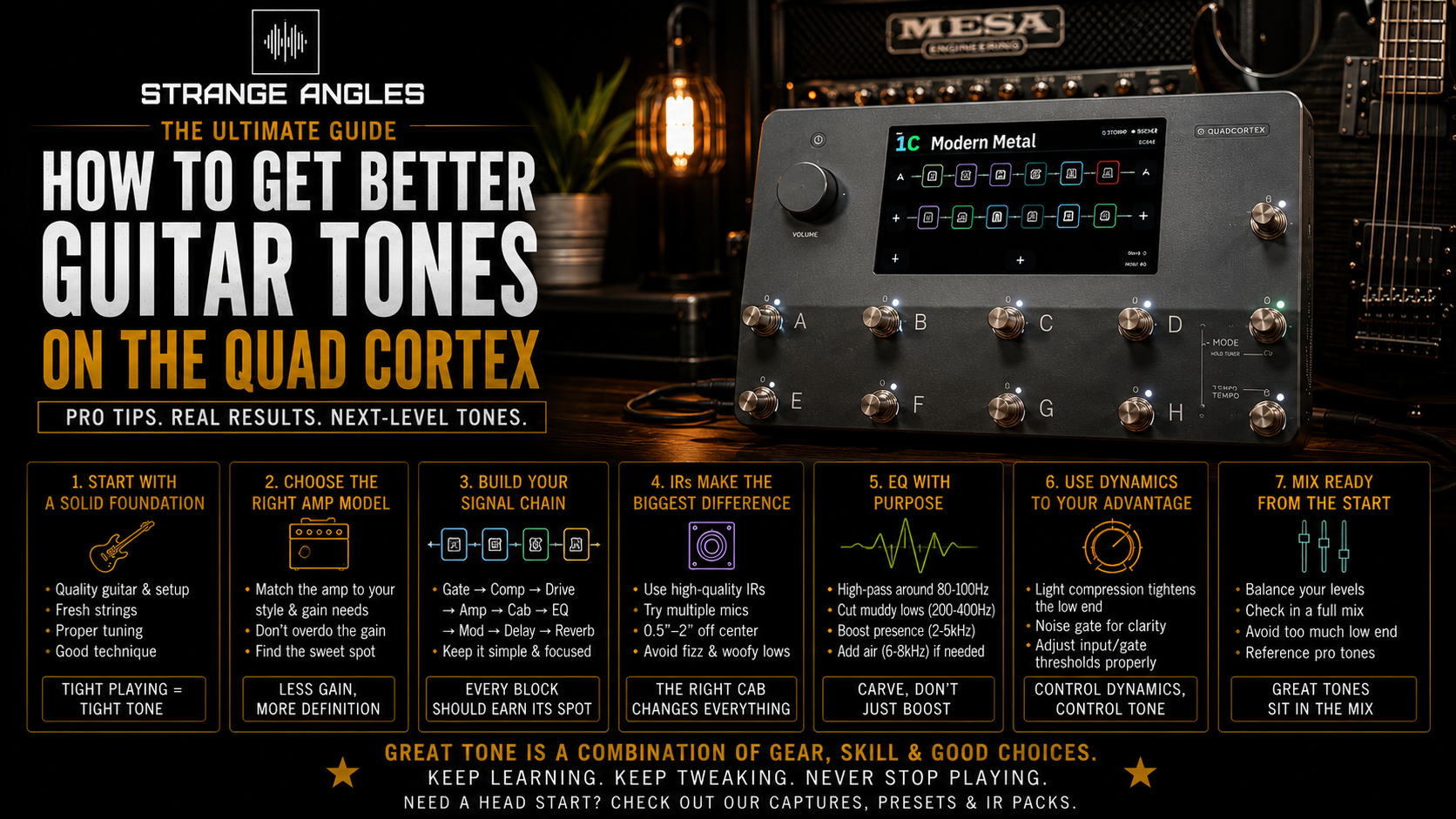
How to Get Better Guitar Tones on the Quad Cortex
The Neural DSP Quad Cortex has become one of the most popular guitar processors available, offering incredible amp models, Neural Captures, effects, and routing options in a compact, stage-ready unit.
While it's capable of producing world-class tones, many new users find themselves overwhelmed by the number of options available. If your presets sound harsh, muddy, or uninspiring, the problem usually isn't the Quad Cortex itself—it's how your signal chain is set up.
These tips will help you get tighter, clearer, and more professional guitar tones from your Quad Cortex.
Looking for Great Tones?
Spend less time tweaking and more time playing. Explore professionally crafted Quad Cortex captures designed to deliver authentic, mix-ready guitar tones for the studio, stage, and beyond.
🎸 Browse Quad Cortex Captures →
Start With a Great Capture
Your tone is only as good as the amp or capture you're using.
Many players immediately begin adjusting EQ, adding compressors, or stacking effects before choosing a quality amp capture.
Instead, start with a professionally created Neural Capture that already sounds balanced.
A great capture should sound inspiring before you add any additional processing.
If the core tone isn't working, adding more effects usually won't fix it.
Choose the Right Cabinet or IR
One of the biggest improvements you can make is selecting a cabinet that complements your amp.
The cabinet has an enormous impact on your overall sound.
Changing your IR can tighten the low end, smooth harsh highs, improve note definition, and completely change the character of the same amplifier.
Experiment with different speaker types such as:
• Celestion Vintage 30
• Creamback
• Greenback
• G12T-75
• Eminence DV-77
Small cabinet changes often make a bigger difference than major EQ adjustments.
Don't Use Too Much Gain
One of the most common mistakes is adding more gain than necessary.
Professional modern metal tones are often surprisingly restrained.
Using slightly less gain results in:
• Better note definition
• Tighter palm mutes
• Less noise
• Better articulation
• Improved recording clarity
When bass and drums are added, lower-gain tones often sound much heavier than overly saturated ones.
Use a Noise Gate Correctly
The Quad Cortex includes excellent noise gates, but using aggressive settings can make your guitar feel unnatural.
Adjust the threshold until unwanted noise disappears while allowing sustained notes to ring naturally.
A properly adjusted gate keeps your rig quiet without affecting your playing dynamics.
High-Pass and Low-Pass Your Tone
Professional guitar recordings rarely use the full frequency spectrum.
Applying gentle high-pass and low-pass filters can make your guitar sit better in a mix.
As a starting point:
• High-pass around 70–100 Hz
• Low-pass around 8–10 kHz
These settings reduce unnecessary low-end rumble and harsh high-frequency fizz.
Always adjust by ear to suit your guitar and mix.
Less EQ Is Usually Better
Many players instinctively reach for the graphic EQ.
Instead, ask yourself whether the amp or cabinet is the real issue.
If you find yourself making extreme EQ changes, consider trying a different capture or impulse response first.
Small EQ adjustments usually sound more natural than dramatic boosts or cuts.
Double-Track When Recording
If you're recording modern metal, don't rely on one guitar track.
Instead:
• Record one rhythm take.
• Record a second performance.
• Pan one left.
• Pan one right.
This creates the wide, powerful guitar sound heard on countless professional recordings.
Avoid simply copying and pasting the same performance, as true double-tracking produces a much more natural result.
Update Your Firmware
Neural DSP regularly releases firmware updates that improve performance, add new features, and expand the available amps and effects.
Keeping your Quad Cortex up to date ensures you have access to the latest improvements and bug fixes.
Great Genres for the Quad Cortex
The Quad Cortex excels across a wide range of styles, including:
• Modern Metal
• Metalcore
• Deathcore
• Progressive Metal
• Djent
• Hard Rock
• Blues
• Classic Rock
• Ambient
• Worship
Its flexibility makes it equally comfortable handling vintage cleans and aggressive high-gain tones.
Frequently Asked Questions
Why does my Quad Cortex sound harsh?
Harsh tones are often caused by cabinet selection, microphone choice, excessive gain, or monitoring through headphones or speakers that emphasize high frequencies.
Trying a different IR or cabinet can often solve the problem more effectively than heavy EQ.
Should I use factory presets?
Factory presets are excellent for learning the device, but creating your own presets—or using professionally designed captures and presets—usually produces better results for your specific guitar and playing style.
Do impulse responses make a difference?
Absolutely.
A quality impulse response can dramatically improve the realism, clarity, and balance of your guitar tone.
Many players consider the cabinet one of the most important parts of the entire signal chain.
What's the biggest mistake new Quad Cortex users make?
Most beginners use too much gain and spend too much time adjusting EQ before choosing the right amp capture or cabinet.
Starting with quality building blocks makes dialing in a great tone much easier.
Final Thoughts
The Quad Cortex is capable of producing incredible guitar tones, but achieving professional results starts with making smart choices throughout your signal chain.
Focus on quality captures, carefully selected cabinets, appropriate gain levels, and subtle EQ adjustments.
Rather than trying to fix a weak preset with endless tweaking, build your sound from a strong foundation. You'll spend less time editing and more time playing.
Ready to Upgrade Your Tone?
Browse Strange Angles Music's collection of professionally crafted Neural Captures, presets, and impulse responses for the Quad Cortex. Designed for modern metal, rock, ambient, and everything in between, our products help you achieve polished, mix-ready tones in minutes.